• AV & IT in the Enterprise – Post 6 of 6

    Every office has them. The digital signage screen in the lobby showing an event from three months ago. The wayfinding kiosk on the fourth floor pointing to a team that moved to a different building in the spring. The space booking panel outside a room that was converted to a storage cupboard sometime last year. The background music system in the canteen that nobody has credentials for and everyone has learned to ignore.

    Nobody installed these things carelessly. Each one arrived with a business case, a budget, and a go-live date. Each one was somebody’s good idea. And each one, at some point after the installation team left, became unclaimed baggage. Sitting in the corner of the org chart. Owned by nobody. Maintained by whoever happens to notice when something is broken.

    The problem does not stay contained. It compounds. Each site configured differently. Each platform procured in isolation develops its own architecture pattern, its own support dependency, its own licensing arrangement. What should be a single line item becomes a sprawl. A digital signage platform licensed in pockets across a global estate, each business unit or regional team procuring their own instance, can cost five or six times more than a single centrally governed agreement. Nobody made a decision to overspend. The overspend is the residue of nobody making a decision at all.

    Hardware follows the same logic. When there is no standard, procurement defaults to whatever was available, whatever the integrator recommended, whatever was cheapest at the time. The result is an estate of mismatched devices, each with its own firmware lifecycle, each with its own management interface, each expanding the attack surface that a security team has to manage. Standardised hardware models do not just make maintenance easier. They reduce the number of variables an attacker can exploit. The security posture of the building is, in part, a function of whether anybody ever decided what the building should run on.

    This is not a new problem. It is the same problem that has run through this entire series, applied to every connected surface in the building that is not a meeting room.


    The Tactical Project Problem

    The meeting room estate, for all its challenges, at least gets attention. There is a procurement cycle. There is an integrator. There is a project. There is usually someone from IT involved, however late they arrive.

    The rest of the building’s technology does not always get that much. Digital signage arrives because a facilities manager saw it at an exhibition and thought it would look good in the lobby. Wayfinding gets specified by the fit-out architect who included it in the furniture schedule. Space booking panels are procured through a workplace technology vendor who nobody from IT was involved with. Background music and media services are handled by whoever managed the last office refurbishment and have not been touched since.

    Each one is a tactical project. A point solution to a specific problem, procured in isolation, delivered in isolation, and left in isolation. No standard. No support model. No connection to the wider estate. No owner.

    Five years later the building is full of systems running on end-of-life hardware, with admin credentials that exist only in the memory of an engineer who left the company in 2021, displaying content that nobody has updated since the last rebrand, and generating data that nobody is reading.


    The Convergence Nobody Planned For

    For a long time these systems could be ignored in isolation because they operated in isolation. The signage was just screens. The wayfinding was just a kiosk. The space booking was just a panel. They did not talk to each other and they did not talk to anything else.

    That is no longer true.

    Space booking systems now integrate with Microsoft 365 calendar infrastructure. Wayfinding pulls from the same workspace management platforms that inform desk allocation. Digital signage is fed by content pipelines that connect to intranet, communications, and operational systems. Occupancy sensors feed utilisation data into analytics platforms that inform property strategy. Third-party SIP integrations even bring physical access into the platform, with intercom and door entry systems at reception routing visitor calls through Teams clients and answering from anywhere in the building.

    And that is before you consider the cyber security and networking implications. These systems sit on the network. If nobody has designed for segmentation, access control, and security architecture across the estate, every new integration expands the attack surface.

    The tactical projects that were procured in isolation are now quietly connected. And because nobody governs the connections, nobody is managing them. When the space booking system changes its API, the wayfinding breaks. When the signage platform updates its content schema, the feed from the intranet stops working. When the occupancy sensor firmware falls behind, the utilisation data becomes unreliable. Each system was someone’s problem. The connections between them are nobody’s problem.

    The platform was always going to converge. The organisations that built their estates through tactical projects rather than portfolio governance are the ones now finding out what that costs.


    The Signage Estate You Are Not Using

    The meeting room display estate is one of the largest digital signage footprints in the building. Dozens, sometimes hundreds, of high-quality screens distributed across every floor. Between meetings those screens are blank. Or showing a screensaver. Or displaying a room name and a booking panel that nobody is reading.

    The communications team does not know they can use them. IT does not think of the room estate as a communications channel. Nobody has connected the digital signage strategy to the meeting room estate because those two things were procured separately, governed separately, and have never sat in the same portfolio conversation.

    The technology to close that gap already exists. Teams Rooms Pro Management supports digital signage natively on room displays when the room is not in a meeting, streaming content from third-party platforms like Appspace and XOGO, or directly from a web URL, configured centrally through the Pro Management portal. The room estate can show corporate news, operational updates, safety messaging, and culture content between meetings with no additional hardware investment. It is a capability sitting idle in most organisations because nobody with a communications brief has ever been told it is available, and nobody with an AV brief has ever thought to tell them.

    The screens are already there, distributed across every floor, in the spaces where employees spend most of their working day. The capability is already there. What is missing is the person who sits at the intersection of the room estate and the communications brief and sees it.


    Your Building Just Got an AI Upgrade

    Over the last few years, and largely without organisations noticing, the building became part of the M365 platform.

    Microsoft Places now reads occupancy data from calendars, booking systems and room sensors to understand how space is actually being used. That data feeds into something more consequential than a utilisation report. Copilot within Places can tell employees which days are worth coming into the office based on who else will be there. It can recommend the right room for a meeting based on how many people are attending in person versus remotely, and what technology is available in the space. When a room becomes unavailable, it rebooks automatically, handling conflicts across recurring meeting series without anyone picking up the phone or sending an email. The building is no longer just a place people come to work. It is beginning to actively help them work better.

    Space management metrics, utilisation data, and room analytics live within Teams Rooms Pro Management and Places, feeding recommendations with real financial consequence about how much space an organisation needs, which floors to consolidate, and where investment should go next.

    The governance gap that started with a meeting room that did not work on Monday morning has just become the foundation on which the AI-powered workplace strategy is being built.

    If the data is ungoverned, the AI is ungoverned. If the systems are orphaned, the intelligence is blind. If the signage estate was never properly maintained, the content delivery layer of the intelligent workplace does not work. If the occupancy sensors were installed as a tactical project and never validated, the utilisation data feeding the property strategy is unreliable. And the organisation making million pound decisions about how much office space it needs, based on data from infrastructure nobody governed, is not making an informed decision. It is making an expensive guess with a confident dashboard in front of it.

    The stakes of the governance gap have changed. They are no longer measured in failed meetings. They are measured in failed building strategies.


    The Domain the Building Needs

    This series began with a helpdesk ticket.

    A room that did not work. A gap between the people who procured the technology and the people who had to support it. A domain that sat between IT, Facilities, and the integrator and was claimed by none of them.

    Post 5 ended with a conclusion. The reason the governance gap remains unsolved in most organisations is not that nobody cares. It is that the discipline that would close it is unnamed, ungoverned, and unrecognised. This post has shown that the same gap extends far beyond the meeting room. The signage. The wayfinding. The space booking. The visitor management. The occupancy sensors. The room display estate that nobody is using for communications. The data flowing into an AI platform that is beginning to make consequential decisions about property and space.

    All of it ungoverned. All of it unclaimed. And all of it falling under the same unnamed discipline.

    That discipline is Workspace Architecture. It exists in the work of the people who have spent their careers at the intersection of technology, space, and human experience. Who understand that a standard is not a product list. That an archetype is not a room design. That a support model is not a helpdesk contract. That the building is not a collection of systems but a single connected estate that serves a single purpose.

    It does not have a formal seat at the table yet. It does not have a universally recognised title, a professional body, or a certification framework. The work gets done in spite of that gap, not because it has been closed.

    But as the building becomes part of the platform, as AI begins to consume the data the estate produces, and as the cost of ungoverned infrastructure rises from a bad meeting to a bad property decision, the case for naming the domain and giving it accountability becomes harder to ignore.

    The baggage has been sitting unclaimed for long enough.

    It is time to put a name on it.
  • AV & IT in the Enterprise – Post 5 of 6

    The standard is written. The archetypes are defined. The rooms are built. The ribbon has been cut and the project has been signed off.

    Now it is Monday morning and something does not work.

    The question of who picks up the phone is not a technical question. It is a governance question. And in most organisations, nobody has answered it.


    The Support Gap

    Post 1 of this series opened with a familiar scene. A new office. A ribbon cutting. A helpdesk ticket already waiting.

    The support gap is not a new problem. But it looks different from the operational side than it does from the procurement side.

    From procurement, the gap is invisible. The integrator was paid. The SOW was delivered. The rooms work on day one. Job done.

    From operations, the gap surfaces slowly. The integrator has handed over and moved to the next project. Facilities think the rooms are an IT system. IT think they are a building system. The managed service agreement, if one exists at all, covers what the contract says and nothing more.

    The vendor and OEM management portals have largely solved the visibility problem. The tooling exists across the major platforms and certified hardware ecosystems to provide real-time estate health, call quality data, and device status across the entire managed estate. The data is there. The question is whether anyone has configured the alerts, whether there is a defined owner watching the dashboard, and whether there is an escalation path that activates when a problem surfaces. Visibility without accountability is not a support model. It is a dashboard nobody checks.

    The user in the room does not care about the org chart. They care that the call starts.


    The Burden of Knowledge

    There is a concept that rarely gets named in enterprise AV design but sits at the centre of almost every support problem. Call it the burden of knowledge.

    In a well-designed room estate, the user carries almost none of it. They walk in, they press join, the call starts. The standard absorbed the complexity. The archetype resolved the platform question before anyone sat down. The interop paths were tested before the room was certified. Nothing in the room asks the user to know anything they should not have to know.

    In a poorly governed estate, that burden does not transfer to the design team, who have moved on. It does not transfer to the integrator, who has handed over. It accumulates. As support tickets. As floor walk requests. As training sessions that have to be repeated every time staff turn over. As calls to the helpdesk from someone who cannot work out why the join button is not appearing for this particular meeting, or why the content sharing is not working from this room, or why the interface looks different to the one they used last week.

    These are not questions that should reach the user. Each one is a design failure that was not resolved before the room opened. And they do not resolve themselves.

    This is why platform choice, at the level of the operational archetype, is not a purely technical decision. A room that requires the user to understand the nuance of which join method works for which meeting type, or why interop behaves differently depending on the platform on the other end of the call, is a room that has not absorbed its complexity at the right level. The standard and the archetype exist precisely to absorb that complexity before it reaches the person in the room. When they do not, the support team absorbs it instead. And the support team, in most organisations, is neither staffed nor equipped for it.


    The Support Model Has to Be Designed, Not Inherited

    Most AV support models are not designed. They are inherited. The integrator knows the estate, so the integrator becomes the support function by default. IT absorbs the service desk tickets because they have a service desk. Facilities handle the physical issues because they handle the building. And somewhere in the gaps between those three, most problems live.

    A designed support model starts with a simple question: what does a healthy room look like, and who is responsible for knowing when it is not?

    That question requires answers at several levels. What does tier one support look like, what can they resolve remotely, and what is the escalation path when they cannot? What remote management tooling is in place, what does it surface, and who is monitoring it? What constitutes an alert condition and who responds to it? What is the SLA for a standards-based room, and is it different for a complex space?

    The answers to those questions do not come from the integrator’s handover pack. They come from a deliberate design process that treats support as a first-class deliverable alongside the rooms themselves. The management plane, the monitoring configuration, the alerting thresholds, the escalation paths are not afterthoughts. They are part of the standard. They belong in the design conversation before a cable is pulled.


    Managed Service Versus In-House

    The build versus buy decision for AV support rarely gets made consciously. It happens by default, usually after the first significant failure, when the organisation realises that nobody on the payroll knows how the complex spaces work.

    The options are real and each has a cost profile. An in-house AV support function gives you capability, institutional knowledge, and direct accountability. It also requires headcount, training, tooling, and a career path that most organisations are not willing to invest in for what they still classify as a building system. An outsourced managed service gives you specialist capability and defined SLAs. It also requires a contract that was written before the estate was built, which means the scope is often wrong by the time the first ticket is raised. A hybrid model, with IT holding tier one and a managed service partner holding tier two and above, can work well when the boundary between them is clearly defined. It fails when it is not.

    The point is not which model is right. The point is that the decision has to be made consciously, at design time, not inherited from whoever happens to be standing closest when something breaks. The support model is as much a deliverable of the standard as the room design. It belongs in the same conversation.


    Concierge Support for the Complex Space

    The ten complex spaces in a hundred room estate carry a disproportionate support burden. They are harder to diagnose remotely. They have more failure modes. They require specialist knowledge to resolve. And they are, almost by definition, the spaces being used for the highest-stakes meetings in the building.

    For a standards-based room, a reactive support model is sufficient. Something breaks, a ticket is raised, the room is resolved. The impact is contained and the risk is proportionate.

    For a complex space hosting a high-stakes event, a reactive model is not sufficient. By the time the ticket is raised, the damage is done.

    Consider the scenario. A flagship event. Two hundred people in the room. Partners, clients, senior leadership. The agenda is full. The speakers are prepared. The room has been booked for months. The AV fails at the start. Not catastrophically, just the kind of fault that a pre-event check would have caught and resolved in the thirty minutes before anyone arrived. Instead it surfaces when the room is full and the clock is running.

    The cost is straightforward to calculate, even without specific figures. Take the number of people in the room. Multiply by your organisation’s fully loaded hourly cost. Multiply by the time lost. Add the catering that ran regardless. Add the reputational cost if the event was client-facing or involved external guests. The deferred agenda does not get recovered. It gets compressed or cut. Whatever that number is in your organisation, compare it to the cost of a concierge engineer for a half day pre-event check. The justification does not need a spreadsheet. It needs an honest conversation about what the event is worth and what it costs when it goes wrong.

    A concierge model for complex spaces is not a luxury. It is the logical operational consequence of having consciously designed those spaces, documented their complexity, and priced them honestly. You knew at design time that these rooms were different. The support model should reflect that.


    The Handover Problem

    Every project has a handover. The integrator completes the build, produces the documentation, delivers the training, and moves on. The client takes ownership of an estate they did not design, running technology they do not fully understand, supported by documentation that captures what was built but rarely captures why.

    The knowledge that sits in the integrator’s lead engineer’s head, the room that needed an extra access point, the DSP configuration that was tuned on site, the quirk in the control logic that was resolved three days before practical completion, does not transfer in a handover pack. It walks out the door.

    This is not a criticism of integrators. It is a structural problem. Handover is a point in time. Knowledge retention is an ongoing operational requirement. The organisation that treats handover as the end of the knowledge transfer has already lost most of it.

    The answer is not a better handover pack. It is a support model that does not depend on one person knowing everything. Documented configurations. Standardised commissioning. Remote management tooling that surfaces the state of the room without requiring institutional memory to interpret it. For complex spaces, a consistent user control interface across the estate means the support team understands the control logic of every room without having to relearn it each time. The archetype does the heavy lifting across the standards-based estate. Ninety consistent rooms means the support team learns one thing deeply rather than a hundred things shallowly. The user learns one interface. The floor walk covers one workflow. The training programme runs once and stays relevant.

    And this scales globally. The user who walks into a room in Paris, Berlin, New York, or London sees the same interface, follows the same workflow, and has the same experience. It is not just consistency. It is familiarity. It becomes the way the organisation does things, embedded in the culture rather than written in a manual that nobody reads.


    SLAs and the Reality of Response Times

    Response time is where the cost of the complex space becomes visible in operational terms.

    A standards-based room with remote management in place can often be diagnosed and resolved without a site visit. A firmware issue, a configuration drift, a network connectivity problem are resolvable remotely if the management plane is properly configured and the support team has been trained on it. The SLA for that room can be measured in hours.

    A complex space with a non-proprietary DSP, a custom amplifier chain, and a control processor running bespoke logic cannot be diagnosed remotely with confidence. It requires someone who knows that specific room, that specific configuration, and that specific failure mode. That person may not be on the service desk. They may not be in the same city. The SLA for that room is measured in days, and the cost of each day is proportionate to how important that room is.

    This is not an argument against complex spaces. Some rooms genuinely need what it takes to build one. It is an argument for pricing them honestly, not just the build cost, but the support cost over the lifetime of the fit-out. A room that costs significantly more to build and an order of magnitude more to support is a different investment decision than the build cost alone suggests.


    Somebody Has to Own It

    This series began with a room that did not work and nobody who owned the problem.

    Post 1 named the gap. Post 2 described why the complexity is real. Post 3 built the standard. Post 4 defined the archetype. This post is about what happens when the standard and the archetype are in place and the estate is live. Who monitors it. Who responds when something fails. Who holds the knowledge when the integrator has moved on. Who makes the conscious decision about managed service, about concierge support, about SLAs that reflect the actual cost of failure rather than the cost of the contract.

    The answer to all of those questions is the same answer as Post 1. Someone has to own it.

    Not facilities managing it as a building system. Not the integrator on a break-fix SLA. A named function within IT, with defined accountability for how the estate is specified, built, and governed. Not budget ownership, that sits elsewhere. Architectural authority. The standing to make design decisions and be in the room when they are made.

    The technology is not the hard part. The technology works when it is specified correctly, built to a standard, and supported by people who know what they are looking at. The hard part is the governance. It always was.

    And the reason it remains unsolved in most organisations is not that nobody cares. It is that the architectural discipline that would close the gap is unnamed, ungoverned, and unrecognised. The work gets done, in spite of the gap rather than because it has been closed. Everyone knows something is missing. Nobody can agree on what to call it or where it sits.

    The domain is Workspace Architecture. It exists. It just does not have a seat at the table yet.


    Next: Unclaimed Baggage.

  • AV & IT in the Enterprise – Post 4 of 6

    Before this post does anything else, it needs to make a distinction that the industry consistently fails to make.

    A requirement is what the business needs the room to do. A standard is what a good outcome looks like and the rules that govern how you get there. An archetype is how you build to that standard, repeatedly, across a diverse estate, without turning every room into a design exercise.

    They are not the same thing. They are not interchangeable. And confusing them is where room estates quietly fall apart.

    An organisation with a standard but no archetypes re-solves the same problems on every project. Every room is a fresh conversation about cameras and codecs and control surfaces, even when the answer was the same last time. An organisation with archetypes but no standard ends up with rooms that look consistent but perform differently, the same kit in rooms where it was never the right answer. An organisation that forgets the requirement exists ends up with beautifully compliant rooms that nobody wanted.

    All three have to exist. All three have to be distinct. This post is about the archetype, what it is, where it comes from, when it bends, and when it breaks.

    The 90/10 Rule

    For every 100 rooms you deploy, 90 should be archetype-based. The answer already exists. The kit is defined, the outcome is known, and the project is a deployment exercise not a design exercise.

    Ten will be complex spaces. They earn that status through documented need, not through drift, scope creep, or a stakeholder who saw something at a trade show. The 90 take care of themselves. The 10 are where the real decisions live.

    Before Huddle Rooms Existed

    The archetype as a concept predates the product category it eventually helped create.

    In a large law firm, practice groups are the operational heartbeat of the organisation. Lawyers working together on a matter need to meet regularly, quickly, and often without notice. In buildings where large meeting rooms were shared, competed for, and frequently unavailable, practice teams were losing time and productivity to a space problem that nobody had framed as a technology problem.

    The solution was a defined room type built around the partner office. Not a full meeting room. Not a shared bookable space. A small, always-available environment where a practice team could convene on demand, either through BYOD or through a compact appliance bringing Teams or Zoom directly into the room as a managed endpoint.

    The effect was twofold. Practice teams got a space that worked for them. The shared meeting room estate got relief from a category of meeting it was never designed to absorb.

    The OEMs eventually arrived at the same conclusion and built a product category around it. The huddle room is now a standard archetype in every estate. But the problem it solved, and the operational logic behind solving it at the room type level rather than the scheduling level, came first.

    That is what an archetype does. It takes an operational problem, defines a solution at the right level of abstraction, and makes it repeatable.


    Defining the Archetype

    An archetype is a defined room type with a defined hardware kit. Not a suggestion. Not a starting point for a conversation. An answer.

    But before the hardware is defined, the archetype has to be anchored in requirements. Every organisation has a baseline – a minimum viable room. The things every meeting space in the estate must be able to do, regardless of size, location, or budget tier. Join a call. Be seen. Be heard. Be managed. That baseline is not the archetype. It is the floor the archetype has to clear.

    The archetype says: this room type gets this proprietary ecosystem. Selected because it meets the outcome mandates in the standard and clears the organisation’s core requirements. Tested in a pilot. Certified before it goes anywhere near a live deployment. And from that point forward, it is the answer to the question before the question is asked.

    That kit does not have to be rigid about platform. A single hardware solution that natively supports Teams, Zoom, and Google Meet as a localised choice still constitutes one archetype, because the hardware, the management plane, and the support model are identical across all three. The platform choice is made at the point of deployment, set through the device’s management platform, and held for the life of that room’s configuration. It is not a per-meeting toggle. The decision is made once, deliberately, as part of the archetype definition. The archetype holds.

    In practice, most estates are served by three archetypes. The complexity compounds as the spaces increase in size, and so do the options available within each one.

    The small room is a video bar, a screen, and a touch panel. Options within the archetype include a microphone extender where the acoustic environment demands it, a room booking panel at the door, a BYOD kit for guests, and platform choice at the point of deployment.

    The medium room steps up to a larger video bar with a wider field of view, the same touch panel, a larger screen. Options extend to dual screens, a content camera for document sharing, microphone extenders, a booking panel, BYOD, and platform choice.

    The large room is where the archetype begins to do more work. The video bar may become a PTZ camera array depending on the room geometry. Screens may become an LED wall. Repeater displays serve the far end of a long table. A content camera and a presenter camera are both on the options list. Wireless presentation becomes relevant. Microphone extenders are more likely than optional. And platform choice at this level may mean a codec swap rather than a software setting, because the room’s requirements have outgrown what a bar-form-factor device can natively deliver.

    The options listed within each archetype are not exceptions. They are the archetype’s response to the environment. A small room with a microphone extender is still a small room archetype. A large room with an LED wall and a presenter camera is still a large room archetype. The kit extends. The archetype holds.

    Physical and Operational Archetypes

    It is also worth noting that an organisation may operate more than one set of archetypes, not defined by room size but by operational context.

    Through the lens of a law firm this becomes immediately clear. Business services and internal practice floors have straightforward requirements. Rooms are used to meet on the organisation’s default platform, Teams in most cases. Interoperability needs are minimal or non-existent. The archetype serves those spaces cleanly and without complication.

    Client-facing floors are a different discipline entirely. These spaces are often more considered in their aesthetic, and their technology has to match. Meetings in these rooms need to interoperate with whatever platform the client is using that day. This is where you see mandates for native rooms: a Teams room, a Zoom room, a Google Meet room, each running the platform natively rather than relying on interop. The hardware may be identical. The standard may be the same. But the operational archetype is different, because the governing context is different.

    Physical archetypes define what goes in the room. Operational archetypes define how the room is configured and what it needs to be capable of. Both have to be defined. And in a complex enterprise environment the two dimensions overlap. A large room on a client floor is both a large room archetype and a client-facing operational archetype simultaneously.


    The Archetype is Not a Cage

    A long room may need several cameras, or cameras mounted at a height that allows them to capture participants at distance rather than shooting past empty chairs at a wall. A wide room presents a different problem – participants on opposite sides of the space need to be captured and framed without the remote end experiencing jarring motion blur as an auto-framing camera tries to keep up, or being ignored entirely by a single camera that was never designed for that geometry. A space used for presentations needs a second display so the presenter can face the room rather than the screen.

    None of these break the archetype. The archetype extends to meet the environment.

    The distinction that matters is whether the extension stays within the proprietary ecosystem. A second camera from the same vendor, managed through the same platform, patched through the same firmware cycle, that is an extension. The archetype holds. The room is still an archetype-based deployment. It just has more of something than the baseline kit.

    The environment shapes the solution. That is not a failure of the standard. It is the standard doing its job, defining the outcome, and allowing the deployment to flex in pursuit of it.


    When Does an Extension Become a Complex Space?

    There is a threshold. Cross it and you are no longer extending an archetype, you are building a bespoke space that happens to share some components with the archetype kit.

    The clearest signal is the introduction of a non-proprietary component.

    A ceiling microphone array is excellent technology in the right environment. It is also a component that sits entirely outside the proprietary support envelope. It requires a DSP to process it. That DSP is a separate device, a separate firmware cycle, a separate failure point, and often a separate support contract. The moment it enters the design, the room can no longer be diagnosed and resolved entirely within the vendor’s own management and support tooling.

    The same is true of repeater displays requiring distribution hardware, environmental controls integrating with building systems, and custom amplifier chains. Each one is a reasonable decision in the right context. Each one is also a line being crossed.

    The test is simple: can this room be fully diagnosed and resolved within the vendor’s native management platform? If yes, it is an archetype-based room, possibly extended. If no, it is a complex space – and should be governed as one from the moment that decision is made, not after the first support call that nobody can answer.


    The Complex Space – Conscious. Documented. Expensive.

    The complex space is not a mistake. Some rooms genuinely need what it takes to build one. A flagship boardroom. A divisible conference suite. An executive briefing centre. An arbitration room in a global law firm where the technology is part of the service the firm is selling.

    But the complex space comes with a contract. It has to be conscious, someone with authority made the decision and understood what they were accepting. It has to be documented, the design rationale, the exception from the standard archetype, the support model, all written down before the first cable is pulled. And it has to be priced honestly. Not just the build cost. The support cost, the maintenance overhead, the extended response SLA, the specialist knowledge required to keep it running.

    The complex space that nobody acknowledged as complex is not a premium room. It is a liability waiting to surface at the worst possible moment.

    Your estate has ten of them per hundred rooms. Probably. Make sure you know which ten they are.


    Next: Who owns it when it breaks.

  • I have been asking for this tool for years.

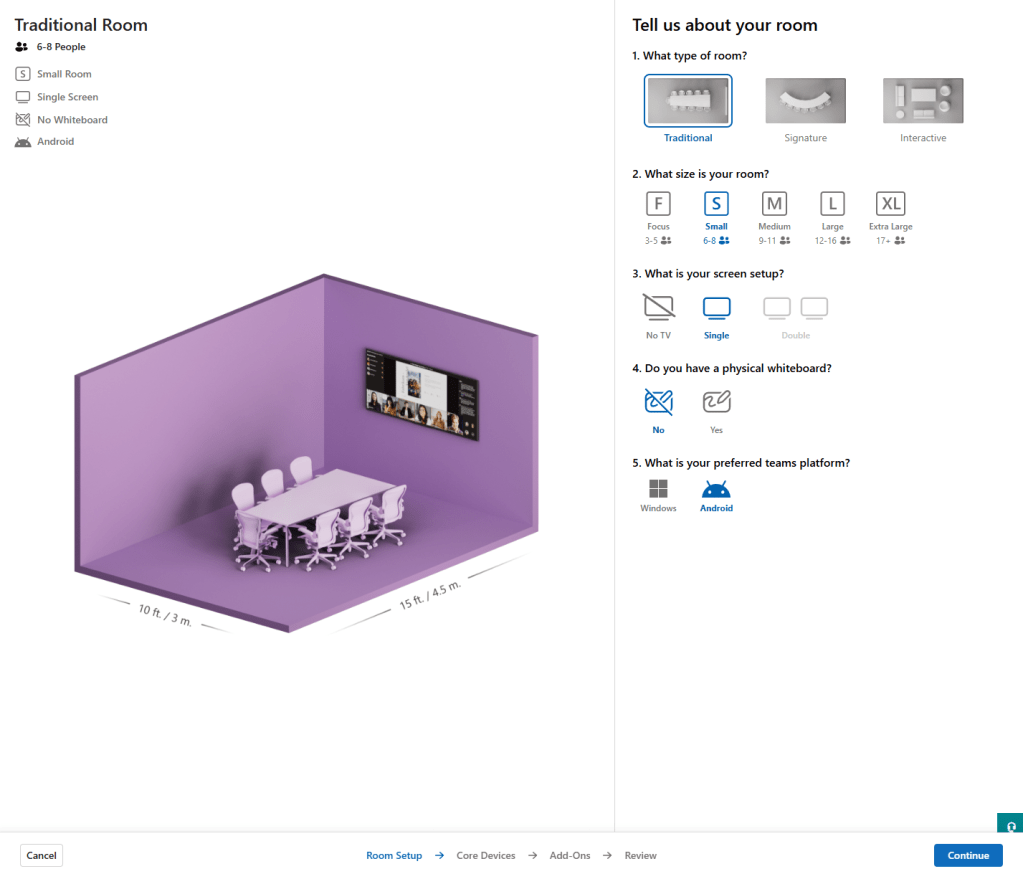
    Not from Microsoft specifically. From anyone who would listen. Every OEM conversation I have had over the past few years has included some version of the same point: someone needs to build a way for IT teams to visualise and define their room archetypes before procurement decisions are made, before integrators are briefed, before a single cable is pulled.

    The OEMs got there first

    Logitech got there first with their Room Configurator. NEAT more recently launched Workspace Designer, which goes further with interactive 3D visualisation, camera coverage overlays, and mic reach mapping. Both are excellent. Both are, understandably, vendor-specific.

    What has been missing is a version of this thinking inside the management platform itself. Microsoft has now built one.


    What it is

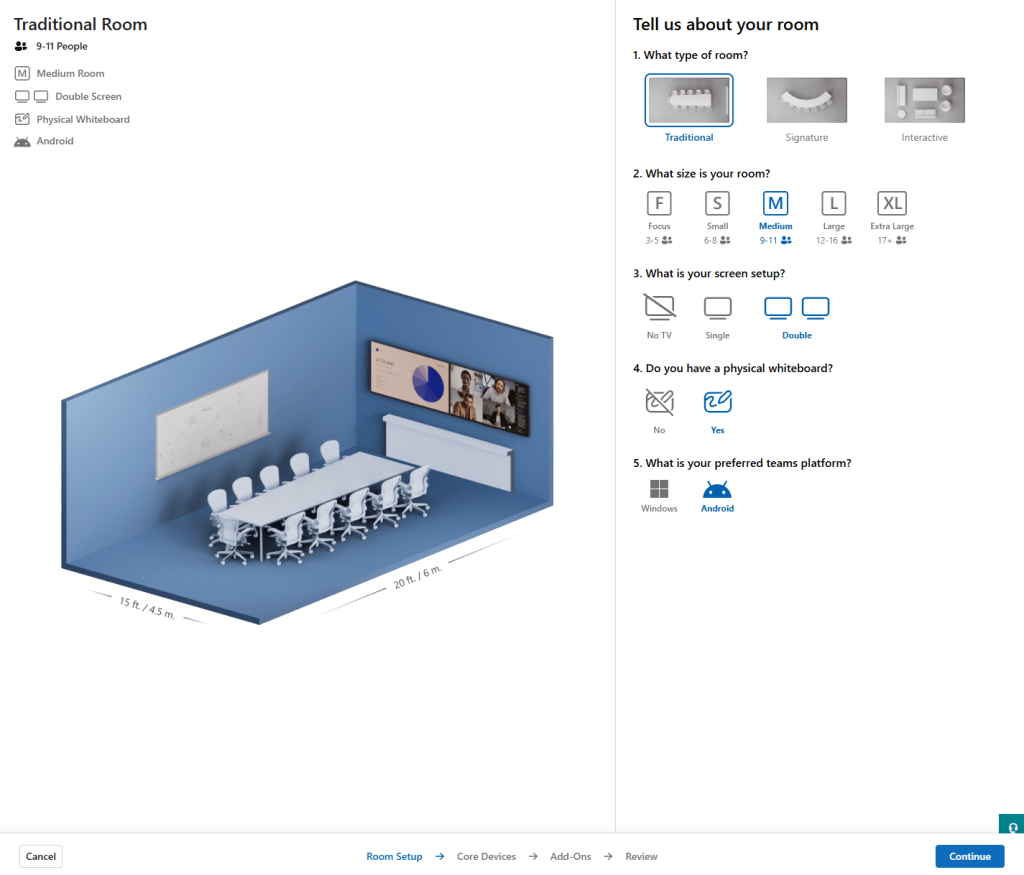
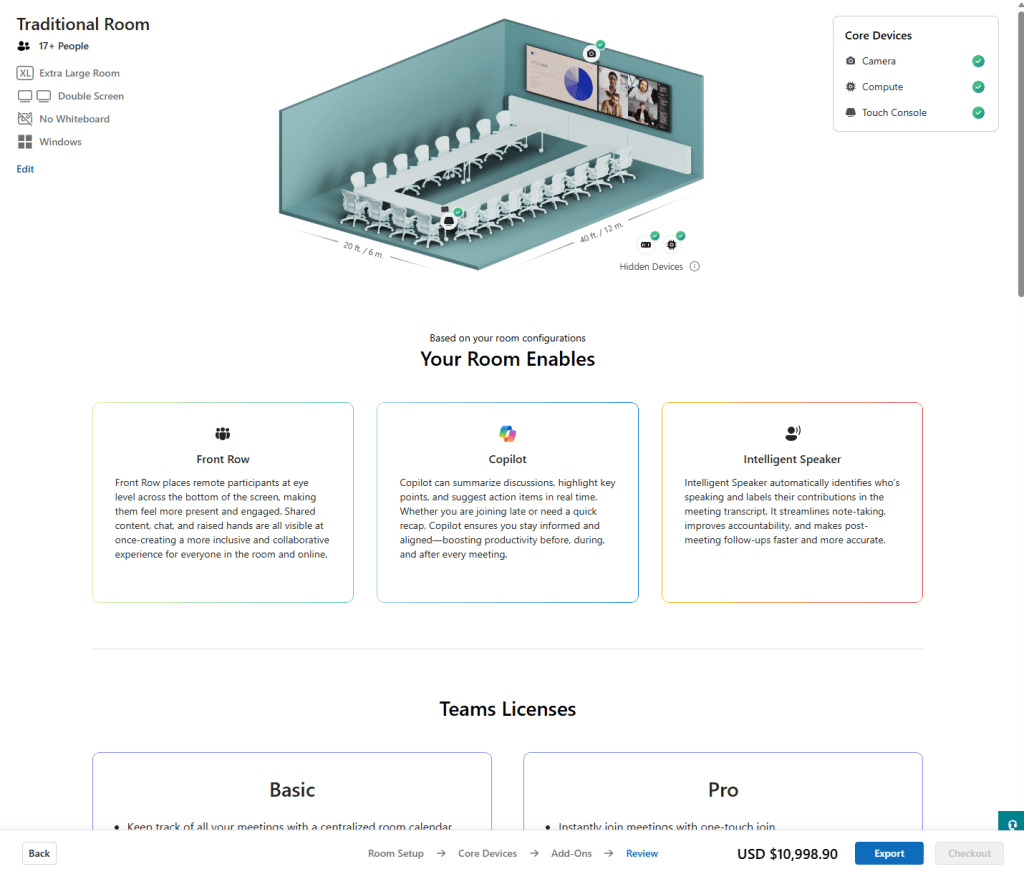
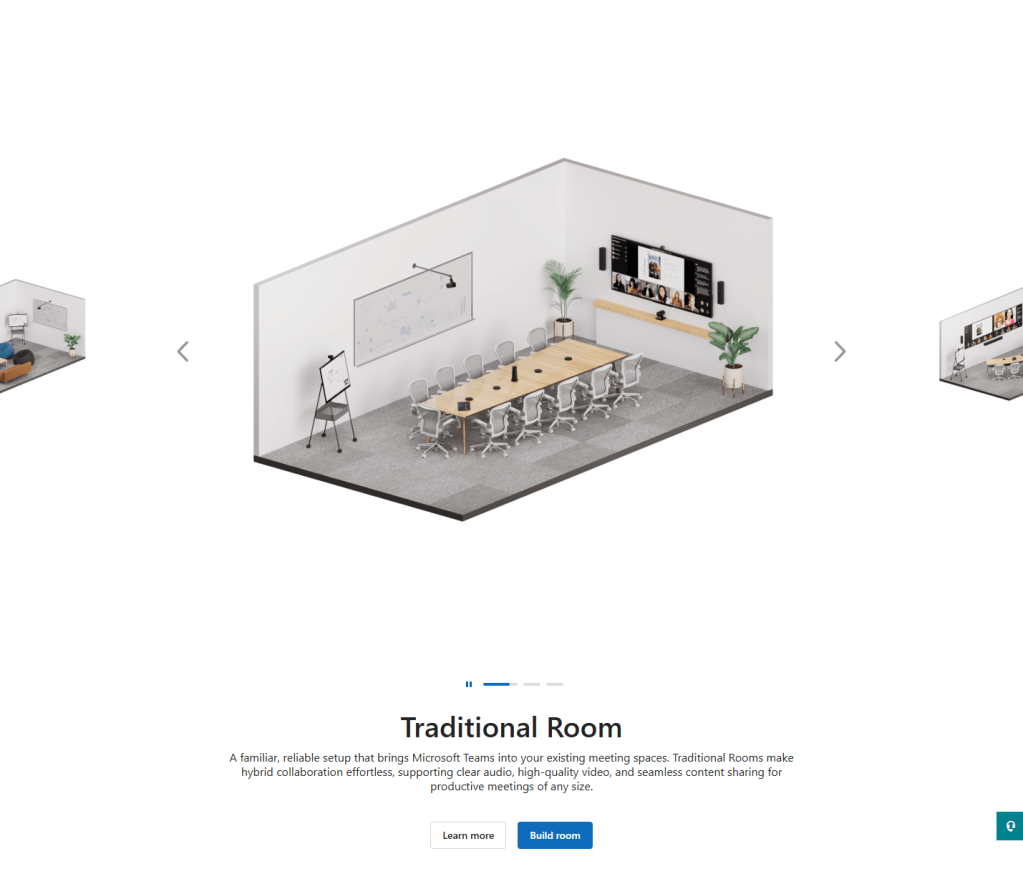
    Room Builder sits inside the Teams Rooms Pro Management portal and is currently in beta. It lets you select a room type, build a hardware archetype from Teams-certified devices across OEMs, and publish that standard to a region, site, building, or specific room. You can export a pick list to pass to an integrator or a purchasing team. The vendor-agnostic positioning is exactly right. Microsoft is in a unique position to show suitable products across the estate without a commercial thumb on the scale.

    This is the tool I have been describing in conversations with the market for some time. Seeing it exist, even in beta, is genuinely satisfying.

    The beta label is doing real work though, and because I think this has the potential to be something important, I want to share where I think it goes next.


    Furniture and orientation

    The furniture archetypes – traditional, signature, and interactive, are the right taxonomy. But orientation control does not yet exist. In a non-standard room orientation the hardware ends up on a wall parallel to the table rather than at the head end. That requires a high field of view camera to capture all participants, such as the Logitech Rally Bar Mini, Jabra PanaCast, or a camera array, and eliminates several seats entirely. Anyone sitting with their back to the screen is a poor meeting experience by any measure. Sub-optimal, but a real-world scenario that happens across enterprise estates every day. Right now the tool cannot represent it. Similarly, all tables in the current build are AV-optimised. Real estates are not. A columnar table changes who can actually be seen by the camera, and that has a direct bearing on what solution is appropriate for the space.

    Room widths are also currently limited to a fixed set of values. Being able to input true room dimensions and then interact with the space to design the solution around them would be significant. It is the difference between planning against a real room and planning against the closest approximation the tool will allow.


    Environmental context and camera specification

    There is also an opportunity around environmental context that I think Microsoft is uniquely placed to exploit. How many sides of a room are glass changes the acoustic design. A heavily glazed room may need extension microphones on the table. That recommendation cannot be made without the input. Camera specification, field of view, viewing distances, multi-camera logic, is another layer that would help IT teams understand what they are actually selecting and why.

    There is a less obvious but equally important benefit here for architects and IT leads carrying these decisions through a project. Being able to evidence why a particular camera was selected, why a second microphone was specified, or equally why one was not, is genuinely valuable when those decisions get challenged later in the delivery cycle. That challenge almost always comes from a non-technical stakeholder. A visual output from a tool like this, something you can put in front of a Facilities team, a project sponsor, or a fit-out contractor, would do a lot of the work that currently falls to a paragraph in a design document that nobody reads.


    The 90/10 threshold

    The most interesting opportunity though is around the 90/10 threshold. Most enterprise room estates fall into a pattern: a defined set of archetypes covering the vast majority of spaces, and then a smaller set of complex environments where the standard answers stop working. LED walls. Divisible spaces. Repeater displays. Ceiling microphone arrays. Removable furniture that directly affects touch panel placement.

    When you cross that line, you are no longer in a self-serve IT deployment. You are in the world of the specialist integrator, and the control and signal processing ecosystem that sits behind them. Crestron, Q-SYS, Extron, and their peers have been the established certified players in this space for good reason. These are not environments where a pick list from a portal will get you to the finish line.

    Right now there is nowhere in the market that clearly maps that boundary. What an IT team can deploy confidently from a standard, and where the handoff to an integrator begins. Microsoft, as a platform-agnostic player sitting across the whole estate, could own that guidance. Room Builder feels like the right place to surface it.


    The export

    The export is basic at the moment. It lists Microsoft capabilities rather than a full bill of materials. Closer collaboration with the OEM ecosystem here, localised pricing, accessory dependencies, cabling logic, would close the gap between planning tool and something that genuinely accelerates procurement.


    Where it goes from here

    This is a beta and it reads like one. The metadata will settle. There are currently some bundles surfaced in contexts where I would not expect to see them, and some gaps where I would. That is the kind of thing that gets resolved as the product matures. The structural questions around environmental variables, camera specification, and deployment complexity thresholds are the ones I am watching.

    The foundation is right. I hope Microsoft keeps building.

  • AV & IT in the Enterprise – Post 3 of 6

    A standard sounds like a constraint. A fixed point. A decision already made on your behalf before you walked into the room.

    That is not what a standard is for.

    A standard, properly built, is a framework that absorbs the complexity of the environment without losing the consistency of the outcome. It doesn’t tell you what to build. It tells you what the user should experience regardless of what you built. And in a world where no two rooms, no two clients, and no two organisations are the same, that distinction is everything.

    This post is about what a standard actually needs to accommodate and why the most important thing it can do is tell you when not to build at all.


    The Client Shapes the Standard

    The first thing a standard has to acknowledge is that you do not always control the platform.

    In professional services, particularly legal, the meeting doesn’t happen on the platform you designed for. It happens on the platform the other party mandates. German courts have historically required SIP connectivity. Not Teams. Not Zoom. SIP, with a dial string, because that is how the court operates and the court is not changing its infrastructure to accommodate your preferred stack.

    A law firm with a global footprint has to be able to join a Munich court via SIP on Tuesday, a San Francisco technology client via Google Meet on Wednesday, and an internal board meeting via Teams on Thursday. Ideally from the same room. The standard has to make all of that possible, not by supporting everything equally, but by defining a clear platform hierarchy with documented interop paths for the clients that sit outside it.

    The Silicon Valley technology client is a useful example in its own right. Google Meet is native to that environment. Startups especially treat it as the default and everything else as friction. If your standard doesn’t account for that profile, if Direct Guest Join from Meet isn’t a tested and documented capability in your certified room estate, you have designed for the organisation and ignored the client they are meeting. That is a user experience failure dressed up as a platform decision.

    Zoom. WebEx. Teams. Meet. SIP. The list of platforms a modern enterprise room estate has to support, depending on the sector and the client base, is longer than most people want to admit. The standard doesn’t pretend otherwise. It maps the landscape honestly and builds the interop layer accordingly.


    Physical, Logical, Security

    Behind every platform decision is a set of standards operating at three distinct layers. Each one shapes the user experience in ways the user will never directly observe, until something goes wrong.

    Physical

    Display sizing is calculated against the furthest viewer. Camera selection follows room geometry, a fixed wide-angle for huddle spaces, a PTZ with auto-framing for larger rooms where occupancy shifts. Microphone coverage is mapped to the table configuration, with full capture across the occupancy range as the brief. Mounting heights are defined and held: a display too high forces unnatural head position across a long call, a camera above eye line changes the perceived dynamic for remote participants. Integration with the building fabric, fire alarm relay contacts, lighting control, BMS occupancy triggers, belongs here too. The physical standard is complete when the room performs at full occupancy, not just under ideal conditions.

    Logical

    It begins with how the room account is created: naming convention, licensing model, mailbox configuration. Platform hierarchy is defined here; Primary platform, Direct Guest Join support, and the rules for meetings that fall outside both. Interop paths are documented against specific client profiles: SIP dial strings for court or legacy connectivity, gateway and PEXIP routing where needed. Network configuration follows: dedicated VLAN, QoS policy to protect call traffic under load, DNS and NTP confirmed before certification. Remote management tooling is configured and tested at commissioning, not added afterwards.

    Security

    Physical security starts in the rack: cabinet doors locked, unused I/O ports shrouded, control panels presenting only what the user needs. Shared credentials are stored in a password vault, rotated on schedule, and never held only in the memory of the commissioning engineer. Remote access for external partners is time-limited, logged, and scoped to minimum necessity. Firewall rules for AV endpoints are explicit. Room accounts sit within the organisation’s identity architecture, conditional access, MFA where supported, and a defined deprovisioning process. Monitoring defines what a healthy room looks like, what triggers an alert, and who responds.

    None of this is validated by configuration alone. Penetration testing during the pilot phase is the mechanism by which the gap between what the standard specifies and what was actually deployed gets found before it becomes an incident. Findings feed back into the standard, not just as remediation for the rooms tested, but as specification changes that close the gap across the estate before it is built. Pen testing after deployment is expensive and disruptive. Pen testing during pilot is design.


    Cost, Function, and the Honest Conversation

    In the public sector, platform decisions are often already in place when a project begins. Procurement frameworks, enterprise licensing agreements, and existing infrastructure commitments shape the environment before the design conversation starts. The constraint shifts.

    The question in that environment is not which platform. It is how much room, at what cost, for what functional outcome.

    The temptation when a budget is constrained is to treat cost reduction as feature removal. Take out the intelligent camera. Simplify the control interface. Drop the room booking panel. The result is a cheaper room that is also a worse room and the users, who had no input into the cost decision, experience only the latter.

    A standards framework at a lower cost point should still deliver a consistent user experience. What changes is the capability envelope, not the quality of the outcome within it. A small satellite office doesn’t need intelligent speaker tracking. It needs a camera that covers the table, a microphone that captures the room, and a control interface that anyone can operate without training. Designed deliberately to that profile, it is not a compromised room. It is the right room for that location.

    The standard defines what each location needs to be. And then it holds that definition.


    When the Standard Says No

    The divisible space is a common brief. A wall that folds away, turning one meeting room into two, or two into one. Flexibility for an organisation that doesn’t always know how it will use the space until it needs to.

    In the right location, with the right support model, a divisible space with full AV in both configurations is a legitimate solution. The switching logic, the combining amplifier, the dual control surfaces, the complexity is real but it is manageable if the people responsible for managing it are present, capable, and resourced.

    In a remote satellite office, with no on-site support, the nearest qualified engineer a flight away, and a user base of thirty people who want to join a Teams call, that same solution is not a feature. It is a liability. When it fails – and it will fail – nobody on site can fix it. Nobody remote can diagnose it quickly. And the organisation has paid a significant premium for a room that is now a source of frustration rather than productivity.

    Adding a second system does not solve this. It compounds it. Two codec systems. Two control interfaces. Double the firmware. Double the failure modes. Double the support overhead for a location that cannot absorb it.

    The standard has to ask a harder question before the design starts.

    Does the divisible space belong in this location at all?

    Not whether it can be engineered. It can always be engineered. Whether the support model of this location can sustain it. Whether the user density justifies the cost. Whether the brief is actually right.

    A standard that never challenges the brief is a production document. A standard that asks whether the brief is right is a design tool.

    That question, asked early, answered honestly is one of the most valuable things a Workplace Architect can do for a project. It is also the one most likely to cause an uncomfortable conversation with the person who specified the divisible wall.

    Have it anyway.


    The Standard Is Not Finished

    The platforms this standard is built around are not standing still. Microsoft, Zoom, Google and Cisco are shipping capability updates on cycles that bear no relationship to a construction programme. A device certified for Teams Rooms in Q1 may have new firmware, new features, and a revised roadmap by Q3. Hardware specified at test fit stage, sometimes twelve to eighteen months before installation, can arrive at practical completion already approaching end of support.

    This is not an edge case. It is the operating condition.

    The standard has to be maintained as a live document, not archived after sign-off. That means a defined owner, a review cadence, and an active horizon-scanning function that tracks platform release notes, OEM roadmaps, and end-of-life announcements. When a certified device is discontinued, the standard is updated before that device is specified into the next project, not after the purchase order is raised.

    It also means being willing to take advantage of what improves. AI-driven noise suppression, intelligent framing, and in-room occupancy analytics have moved from premium differentiators to standard inclusions on mid-range hardware in the space of two years. A standard written before those capabilities existed will underspecify what is now achievable at the same cost point. Horizon scanning is not just about managing obsolescence. It is about knowing when the floor has risen and updating the standard to stand on it.

    The standard is a point-in-time expression of best practice. Treated as permanent, it becomes a constraint. Maintained actively, it remains what it was designed to be.


    The User Never Sees the Standard

    A well-applied standard is invisible.

    The user in Munich doesn’t know that the SIP dial string resolved correctly because someone wrote a gateway policy three months before the room opened. The user joining from Google Meet doesn’t know that Direct Guest Join was tested against four platform combinations before the room was certified. The user in the satellite office doesn’t know that the simple room they’re sitting in was deliberately specified that way, because the alternative would have been a complex room nobody could support.

    They just know the call worked.

    That is the point of the standard. Not to make the architect’s life easier, though it does. Not to make the design process faster, though it does that too. To make the outcome consistent enough that the technology disappears and the meeting happens.

    The standard doesn’t constrain what you build.

    It defines what the user should never have to think about.


    Next: Not Every Room is Special.

  • AV & IT in the Enterprise — Post 2 of 6

    A question I’ve been asked. A question most people in this industry have been asked, more than once.

    Strip it back far enough and that’s genuinely all it is. Screens and cameras on walls, microphones on a ceiling or a table. How hard can it be?

    And therein lies the rub.

    Because complexity in this space rarely comes from the requirements. It comes from the environment those requirements have to land in. The width of the space, the lighting fixtures, three sides of windows in a 30ft boardroom that leave you wondering where the AV is supposed to go. A beautiful room. A nightmare to design for.

    All while the budget insists on hardware that was never really meant for any of it.

    A client sees a screen on a wall. You see five converging systems, no obvious install points, a budget that doesn’t match the brief, and eight stakeholders with different definitions of done.

    That gap is what this post is about.

    The Client’s World

    The expectations clients bring to an AV project are almost always shaped by what AV used to be, not what it is now.

    They remember the projector that dropped from the ceiling. The conference phone in the middle of the table. The laptop cable that either worked or didn’t. Simple systems with simple failure modes. You knew what was broken and roughly how to fix it.

    Modern rooms are a different problem entirely. And most clients don’t know that yet when they walk into the first meeting.

    The request sounds completely reasonable. “We want people to be able to join any meeting from any room.” Of course they do. Everyone does. It sounds like a single sentence of requirement. It is not.

    Behind that sentence is a question about which platforms the organisation needs to support, which guests will be joining from outside it, and what the acceptable failure mode is when the two don’t speak the same language. In the Microsoft Teams Rooms ecosystem that means navigating Windows MTR, PEXIP, SIP dial strings, DTMF tones, and Direct Guest Join flows that behave slightly differently depending on which platform is on the other end of the call.

    The interop story has improved. In 2026 it is meaningfully better than it was. But the knowledge burden of making it invisible to the user is still significant. The moment it surfaces, a dial string on screen, a protocol choice presented to someone who just wants to press join, a button that isn’t there, it has already failed. Not technically. From the user’s perspective.

    This is where the client’s world and your world diverge. They asked for a room that works. You are now designing a support model, a platform hierarchy, and a set of placement decisions about which rooms carry which capability. A space used primarily by technical teams can absorb more complexity. A client-facing boardroom cannot. The room that needs to handle anything, with anyone, on any platform, with no technical support in the building, is a different design problem entirely.

    And when the requirement pushes beyond what standard certified OEM kit can deliver, which it often does, that conversation needs to happen early and honestly. Not as a caveat at the end of the project. As a constraint at the beginning of it.

    The Environment Fights Back

    Assume for a moment that the requirements are clear, the platform is agreed, and the budget is sufficient. You still have the room.

    The 30ft boardroom with three sides of windows is a real example, and a useful one. There is no obvious wall for a display. The ceiling is feature-heavy and the lighting designer got there first. The acoustic spec was written without a microphone array in mind. Every decision that makes the room beautiful makes it harder to design for.

    And then there is the question of being seen.

    There is significant discussion in the industry around multi-camera setups, cloud intelligent framing, and speaker attribution within the Teams Rooms ecosystem. The technology is genuinely impressive. But we still routinely deploy AV into traditional columnar meeting rooms with non-optimised furniture and expect it to perform. The person at the opposite end of the table to the camera. The delegate on the far side of a wide room, outside the field of view of a single framing camera. The technology exists to solve these problems, but those solutions require decisions about camera placement, power, data, and ceiling penetrations that have to be made before the walls close and the electrical installation is completed.

    By the time someone raises their hand from the far end of the table and nobody on the call can see them, it is too late to have that conversation.

    Now make it flexible.

    Hyper flexible spaces are the modern brief. Divisible walls that turn one room into three. Furniture on castors. Screens that need to serve a 200 person all-hands on Tuesday and a six person workshop on Wednesday. AV that has to work in every configuration or it effectively works in none.

    But flexibility compounds the problem in ways that are easy to underestimate. A divisible space isn’t just a switching challenge. It’s a control surface challenge. Each configuration of the room needs an interface that makes sense for that configuration. A panel that works for a boardroom setup may be completely wrong for a training room or a casual collaboration space. And in a space where the furniture moves, where the wall folds away, where the room becomes something different depending on the day, the question of where the control surface lives and what it presents to the user is not a detail. It is a design decision that determines whether anyone in that room can actually operate the technology without calling for help.

    The switching logic alone for a properly divisible space is a project within a project. The control design is another one.

    But the harder conversation is still the upstream one.

    By the time IT is typically engaged on a new build or major fit-out, the building decisions are already made. The walls are placed. The floors are poured. The conduit routes don’t exist because nobody thought to ask. In the US and across much of Europe, coring through a concrete floor is not an afternoon’s work. It is a planning conversation, a cost conversation, and sometimes a conversation with the building owner about whether it’s permitted at all.

    The argument for getting IT involved at test fit stage is not about ego. It is about avoiding expensive compromises later. Where walls are placed, where ceiling zones are defined, where power and data are provisioned, all of these decisions shape what AV can and cannot do in that space for the lifetime of the fit-out. Getting a seat at that table early is one of the most valuable things a Workplace Architect can do for a project. And it is still, frustratingly, the exception rather than the rule.

    Complexity Is Not The Enemy

    Here is what the 30ft boardroom, the divisible wall, the interop requirement, and the eight stakeholders have in common. None of them are problems. They are inputs. The complexity they produce is not something that went wrong. It is the honest output of honest requirements meeting a real environment.

    The mistake is treating complexity as something to be hidden, smoothed over in a presentation or buried in a schedule. It doesn’t stay buried. It surfaces later, at higher cost, with less time to resolve it.

    The real work is distillation. Separating what is needed from what is wanted. Identifying what is an imperative and what is a nice-to-have. And then asking a question that the industry does not ask often enough.

    Does the requirement, and its associated cost, actually match the profile of this location?

    Not every room needs to do everything. A small satellite office has different functional needs to a regional hub. A regional hub has different support requirements to a flagship headquarters. Treating them identically is how projects become overspecified in some places and underdelivered in others.

    Location profiling gives you the framework to have that conversation early. Small Office, Large Office, Regional Hub. Each with a defined functional capability. Each with a defined support model and the team size required to deliver it. Each with a cost profile that the business can evaluate against the value the space is expected to deliver.

    That conversation, about what each location actually needs to be, is not a technical conversation. It is a business conversation. And it is the one that, more than any other, determines whether the project delivers what was intended.

    The complexity was always there. The job is to find it early, name it clearly, and build something that the environment will actually support.


    Next: The standard that sets you free.

  • AV & IT in the Enterprise — Post 1 of 6

    Picture the scene. A new office opens. Leadership walks through the space with an architect’s render in hand, pointing at clean glass walls and nodding at the ceiling-mounted speakers. “The AV is sorted,” someone says. The integrator has been paid. The ribbon is cut. The helpdesk ticket is already waiting.

    This is where most Enterprise AV stories begin. And most Enterprise AV disasters are born.

    “How hard can screens on walls be?” is the most expensive question in facilities management.

    The problem is not technology. The screens work fine on day one. The cameras connect. The codecs handshake. The problem is ownership, or rather the complete absence of it.

    In most organisations, audiovisual infrastructure falls into a gap between departments who each believe, with complete sincerity, that someone else is responsible for it.

    Facilities: “We spec’d the room. AV was in the fit-out.”
    Procurement: “Signed off on the SOW. Job done.”
    IT: “That’s not on our estate. It’s a building system.”
    Project Management: “We delivered on time, and on budget.”
    The Business: “We just need the room to work on Monday.”

    Five departments. Zero owners.

    The Support Reality

    When a meeting room fails at 8:47am, the call goes to a helpdesk agent with no visibility into the AV system, no access to the management platform, and no escalation path that does not involve a three-day SLA with an integrator two counties away. The exec in the room does not care about the org chart. They care that the board call starts in four minutes.

    AV has always been treated as furniture. You buy it, you install it, and then you expect it to just exist, like a desk or a partition wall. The integrator hands over a system designed for day one, not for day three hundred and forty seven, when the firmware has not been patched, the room booking system has changed twice, and the codec is running an end-of-life software version nobody knew about.

    Then IT arrives. Usually late. Usually because something broke.

    By the time IT is meaningfully involved in Enterprise AV, the estate is already sprawling. Different vendors across different sites, no unified management, no standardised configuration, and a support model written for a world where “AV” meant a projector in a boardroom used twice a quarter.

    Modern AV is IT. It runs on your network. It holds your meetings. It processes your video. Treating it otherwise is a choice, and it is a choice with consequences.

    Those consequences are not abstract. They arrive in three forms, and all of them are expensive.

    Reputational

    The board call that drops. The client pitch where the laptop will not connect. The all-hands where the remote offices cannot hear. Every failure is visible, and in a world of hybrid work, every meeting room is a public stage.

    Operational

    Shadow IT workarounds multiply. People stop booking certain rooms. Meetings start late as a default. Productivity loss becomes normalised and invisible, because nobody is measuring it against the Enterprise AV estate that caused it.

    Financial

    Emergency call-out fees. Repeated site visits for problems that remote management could have resolved. Parallel support contracts from IT and the integrator, neither of whom covers the gap. Refresh cycles driven by frustration, not lifecycle planning.

    None of this is inevitable. But none of it gets fixed until someone in the organisation is willing to say a sentence that currently has no owner:

    AV is our problem, and we are going to manage it like one.

    The gap between AV and IT is not a technology problem. It is not a procurement problem. It is a governance problem, and governance problems do not solve themselves. They compound.

    The rest of this series is about how to close that gap. But before you can close it, you have to be willing to look at it clearly.

    So look. Really look. Count the rooms in your estate where you do not know who is responsible if something fails tomorrow morning. Count the meeting spaces where the support path ends with “call the integrator.” Count the sites where IT cannot see the AV devices on the network because nobody ever told them they were there.

    That number, whatever it is, is your exposure.


    Next: How hard can screens on walls be?